
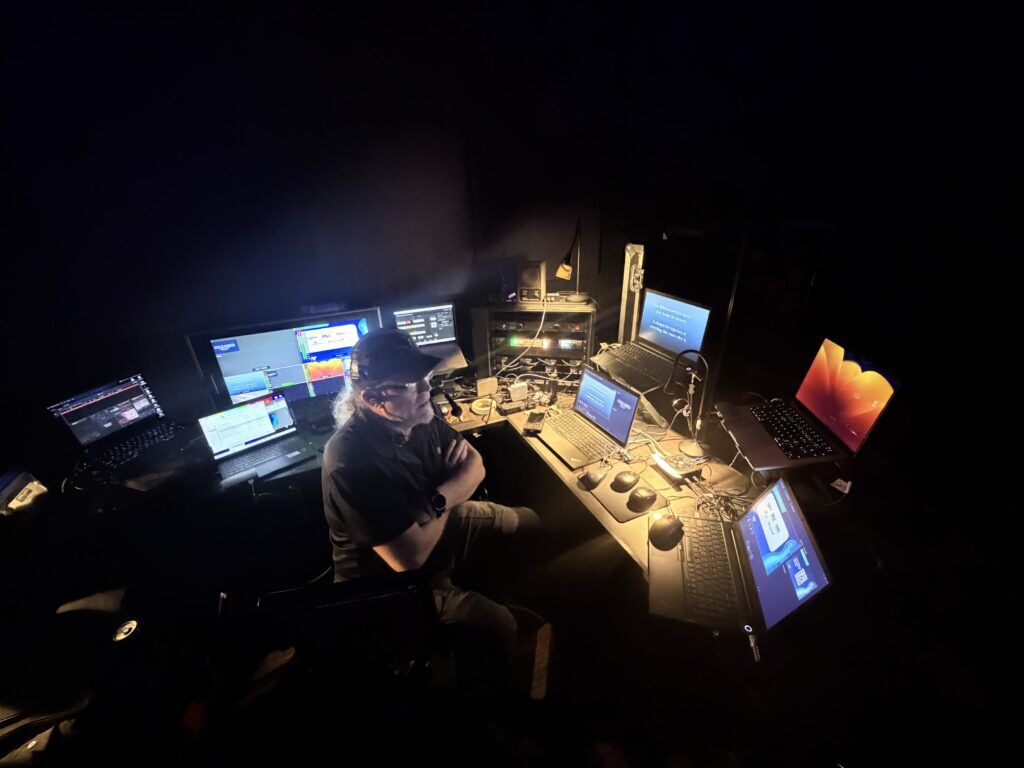
When people think about video production for a corporate conference, the setup can sound pretty simple.
You need a computer to run the PowerPoint presentation. Maybe another computer to play videos. Connect everything to the screens, and you are ready to go.
In professional event production, it is rarely that simple.
We recently provided audiovisual production for a conference in Nashville where the initial expectation was that only a couple of computers would be necessary. Once we looked at the complete show requirements, however, it became clear that the event needed a much more sophisticated presentation system.
That is where the Video Village comes in.
What Is a Video Village at a Corporate Event?
A Video Village is the backstage or production-area workspace where video technicians manage the many different sources being sent to the screens throughout an event.
Depending on the conference, those sources might include:
- PowerPoint and Keynote presentations
- Presenter notes
- Confidence monitors
- Video playback
- Sponsor slides
- Housekeeping slides
- Walk-in and break loops
- Audience polling
- Remote presenters
- Graphics
- Cameras
- Recording systems
- Video switchers and routing equipment

What may appear to the audience as one seamless presentation is often the result of several computers, video systems, and technicians working together behind the scenes.
Why Isn’t One PowerPoint Laptop Enough?
For this Nashville conference, we had a primary computer dedicated to running PowerPoint presentations.
But professional event production also requires redundancy.
If the primary presentation computer freezes, crashes, loses its connection, or experiences another issue, the audience should ideally never know that anything happened. That means having a second presentation computer loaded with the same content and ready to take over immediately.
Having a backup presentation computer is one of the simplest ways to reduce risk during an important corporate event.
Presenter Notes and Confidence Monitors
This conference also required presenter notes to appear on a confidence monitor.
A confidence monitor is a screen positioned so that the speaker can see information that the audience cannot. Depending on the event, that screen might display the current presentation slide, the upcoming slide, presenter notes, a countdown timer, or other information.
Managing those notes properly required another computer and another video signal.
The audience might only see one PowerPoint slide on the main screen, but the presenter could be seeing an entirely different version of that presentation at the same time.
Dedicated Video Playback
We also used a MacBook Pro specifically for video playback.
Videos should generally not be treated as an afterthought inside a PowerPoint presentation during a high-level corporate event. Having dedicated playback gives the video technician better control over playback, audio, transitions, and troubleshooting.
It also allows the presentation operator to remain focused on advancing slides while another system handles video rolls.
Sponsor Slides, Housekeeping Loops, and Holding Graphics
Between presentations, you do not necessarily want the audience staring at a PowerPoint desktop or a blank screen.
Corporate conferences frequently require sponsor slides, housekeeping information, event branding, walk-in graphics, break slides, or looping content.
For this event, we used an additional computer so that we could transition smoothly between presentations and these other visual elements.
The goal is to make every transition feel intentional.
Audience Polling With Slido
The conference also incorporated interactive audience polling through Slido.
That required another computer dedicated to managing the polling content and feeding the appropriate information into the video system.
Interactive tools such as Slido can be incredibly effective for engaging an audience, but they also add another layer to the video production workflow.
Managing the Video Switcher
At the heart of a professional conference video system is the video switcher.
The switcher allows the video technician to select which source is being shown on the screens at any given moment. Depending on the system, a dedicated computer may also be used to configure routing, labeling, multiviews, scaling, presets, and other functions.
That computer may never appear on the main screen, but it is an essential part of controlling the overall video system.
Synchronizing Presentations With PerfectCue
For this Nashville conference, we also deployed a DSan PerfectCue presentation control system.
PerfectCue allows presenters to advance their own slides using a wireless remote while communicating directly with the presentation computers.
Our system allowed us to tie four presentation laptops together so that multiple computers could advance simultaneously.
That meant the primary PowerPoint, backup PowerPoint, presenter notes, and other related presentation systems could remain synchronized.
If the primary presentation computer experienced a problem, the backup was already on the exact same slide.
That level of redundancy is extremely important when producing executive presentations, keynote sessions, general sessions, and other high-profile corporate events.
Why We Moved the Video Village Backstage
Once all of these systems were combined, it became clear that the video technician needed more than a small table in the corner of the ballroom.
There were multiple laptops, preview monitors, presentation controllers, the video switcher, routing equipment, cabling, communications equipment, and other production tools that needed to be organized and accessible.
We therefore positioned the Video Village backstage.
This provided two major advantages.
First, it gave the technician enough room to properly operate and monitor the system.
Second, it created a much cleaner appearance in the ballroom. Instead of guests seeing a large collection of computers, monitors, cables, and production equipment, the technology remained behind the scenes.
Professional AV Production Is About Planning for the Unexpected
One of the biggest differences between simply renting audiovisual equipment and hiring a professional event production company is preparation.
The audience should never have to think about which computer is running the PowerPoint presentation, whether the backup laptop is ready, how the presenter notes reach the confidence monitor, or how the video technician switches between a presentation, video, sponsor slide, and audience poll.
They should simply see a polished, seamless event.
Behind that simplicity may be a surprisingly complex production system.
That is why we say: it takes a Video Village.
Atlanta Pro AV provides complete audiovisual production for corporate meetings, conferences, general sessions, keynote presentations, and special events. Our team provides professional video systems, presentation management, audio, lighting, LED video walls, projection, staging, cameras, livestreaming, and experienced event technicians for productions in Atlanta and throughout the Southeast.